Vendor Setup
This page is for organizations with purchasing requirements, such as vendor registration, a W-9 or other tax forms, or compliance documents. Have a credit card and just need to buy Barcode Producer? We’d be happy to sell it to you with instant access and no paperwork on our order page.
If your organization has specific purchasing and documentation requirements, or you have questions about getting set up to purchase from us, we’re happy to help.
All sales and invoices for Barcode Producer are via a third party: Bright Market, LLC (doing business as FastSpring). FastSpring acts as the merchant of record and formal reseller of the Barcode Producer software. This means FastSpring sells you the license, sends your invoice, and collects your payment and any tax. All Barcode Producer invoices are from FastSpring, so FastSpring is the vendor to set up in your systems for payment. It’s also quite possible they’re already in your system – they provide merchant of record services for many B2B products.
Which company do we set up as the vendor?#
FastSpring. Use these details for your vendor record:
Bright Market, LLC dba FastSpring
801 Garden St., Suite 201
Santa Barbara, CA 93101
USA
Your quote and invoice show the Barcode Producer name and logo, and order numbers start with “SUPERIORWARE”. The seller on your quote and invoice is FastSpring, and FastSpring is the company you pay.
Here is what each company does:
- FastSpring is the merchant of record: the actual seller of our software. You buy your license from FastSpring, so your quote, invoice, and receipt come from FastSpring. Vendor forms, tax forms, and bank details come from FastSpring too.
- Superiorware LLC makes Barcode Producer. We license the software to you and support you. When your payment completes, we send you an email to
set up your account. Please ask us about pricing, quotes, and the software itself.
Where do we find the details our vendor form asks for?#
FastSpring’s Vendor Onboarding Fact Sheet answers most vendor onboarding questions. You can download it from FastSpring’s supplier setup page. It includes:
- Business name: Bright Market, LLC (DBA FastSpring)
- Parent company: FS Intermediate Holdings, Inc.
- Ultimate owner: Accel-KKR
- Office and remittance addresses
- Contact information (email, phone, fax)
- Tax IDs (FEIN, VAT IDs, PAN, and tax registration numbers by country and US state)
- Date of formation and federal tax classification
- D-U-N-S number, NAICS and SIC codes, and SAM registration
- Business size and number of employees
- Disadvantaged/minority business certification details
- Legal and compliance information (Privacy Policy, Terms of Sale)
Your team can copy these details into your own vendor form. FastSpring allows its corporate information to be transferred or reformatted, as long as you keep the original document in your records.
W-9, tax residency certificates, and other documents#
FastSpring’s W-9 form is here: https://fastspring.com/w9.pdf
For all other documents, visit the FastSpring Trust Center:
- Scroll down to Documents.
- Select the Public tab.
- Click View all documents.
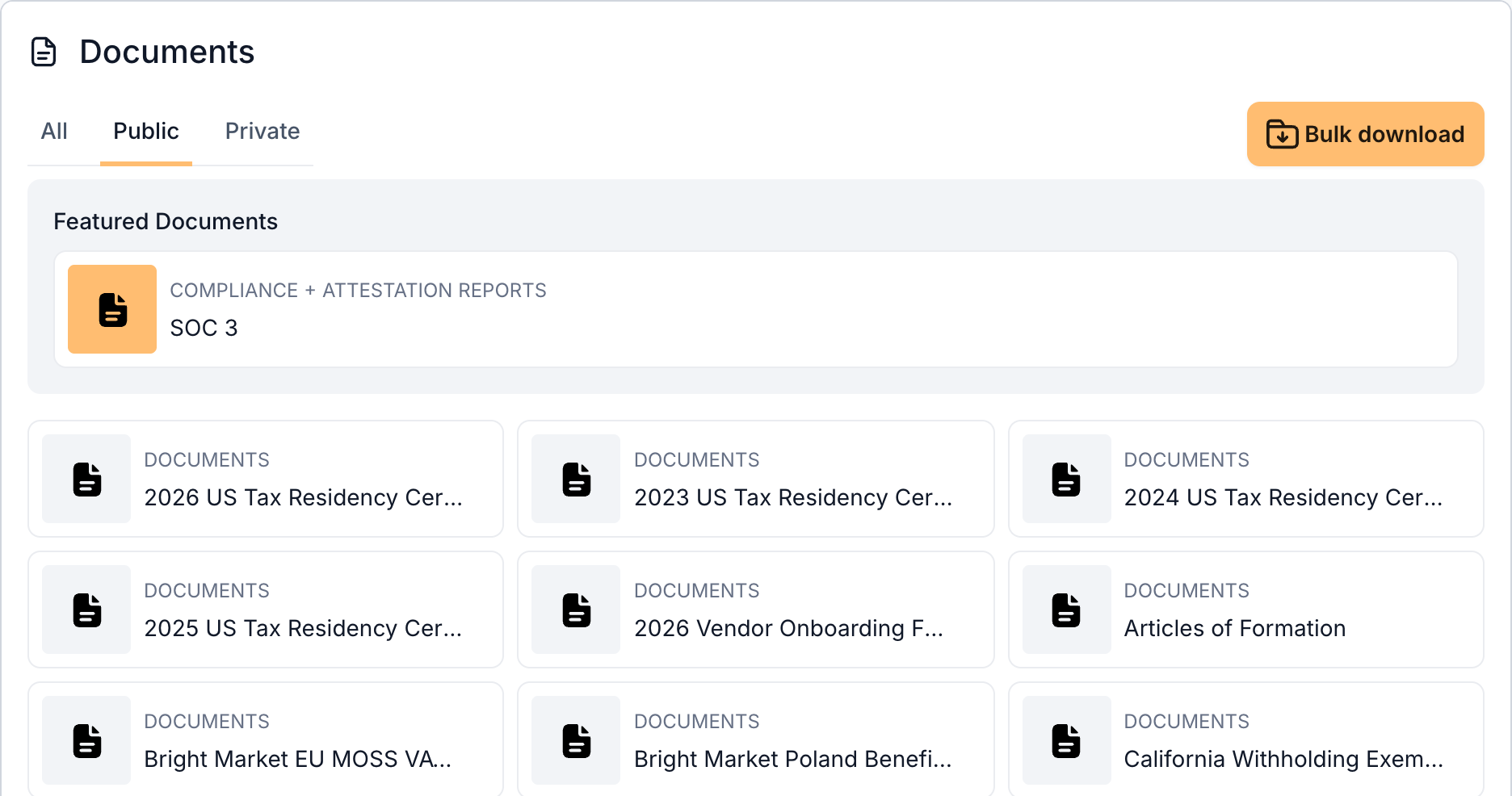
This library includes W-9 forms, US tax residency certificates, articles of formation, a certificate of liability insurance, FastSpring’s business license and EU VAT registration, and country-specific tax documents such as Japan’s JCT number, India’s Form 10-F, and Indonesia’s Form DGT.
AP portals: SAP Ariba, Coupa, Paymode-X, and PaymentWorks#
FastSpring is a registered supplier with major AP portals, including SAP Ariba, Coupa, Paymode-X, and PaymentWorks. Your organization starts the connection:
- From your portal, send a supplier invitation to b2b@fastspring.com. On SAP Ariba, FastSpring’s Ariba Network ID is AN01185011494.
- FastSpring completes its onboarding steps within the portal.
Please send the invitation to FastSpring, because FastSpring is the vendor. FastSpring can’t sign in to a portal that your organization runs itself, or to other onboarding tools.
Bank details and bank letters#
FastSpring’s bank details depend on your country and currency, so they are different for each order and aren’t available in advance. To get the bank details, create an invoice:
Create a quote and turn it into an invoice. - On the invoice, click Pay Now and select Wire Transfer.
Your invoice then shows the bank details for your order. The account holder is Bright Market, LLC dba FastSpring. There’s no charge to create a quote or an invoice, so you can do this while your purchase is still being approved.
If you need a bank letter or a wire confirmation, open a case with FastSpring and include your invoice. FastSpring will provide banking documentation that matches your invoice. FastSpring can also review a request to verify bank details by phone.
Wire transfers are available on invoices of $750 USD (or equivalent) or more.
Can you fill out our onboarding documents or register on our portal?#
No – in most cases, we’re not able to complete customer-provided forms, questionnaires, or online registration processes, for legal reasons.
All of the information and documentation you’re likely to need is available on this page or from FastSpring’s pages. Your team can enter this information into your own forms. We’ve engaged FastSpring as our merchant of record to make this process as easy as possible for our corporate customers.
FastSpring provides its information by email or PDF, and doesn’t complete forms inside a buyer’s own systems either. If your process needs something that isn’t published, you can open a case with FastSpring. Requesting a special form to be filled out is not recommended, as it will very substantially delay your order, and completion of a form is not at all guaranteed.
Security and compliance reports#
Your payment and purchase details are handled by FastSpring. Its SOC 3 report and PCI DSS compliance information are in the FastSpring Trust Center. FastSpring doesn’t share its SOC 2 or PCI DSS reports with buyers, or provide security documentation beyond what’s published there.
License agreement#
The Barcode Producer software license is between your organization and Superiorware LLC. Here’s the current license agreement (a.k.a. EULA; terms and conditions).
Your purchase itself is covered by FastSpring’s Terms of Sale and Privacy Policy. FastSpring doesn’t sign separate NDAs, codes of conduct, or buyer terms.
Who makes Barcode Producer?#
Barcode Producer is a product of Superiorware LLC, and has been available since 2002. The software license is between your organization and Superiorware LLC. Our address and contact details are on our company page.
Superiorware LLC is a wholly owned subsidiary of Scanned Inc., a United States corporation.
How do we contact FastSpring?#
Use the Create Case button at the bottom of FastSpring’s supplier setup page, and include the link to your quote or invoice. It may take them a few business days to reply. FastSpring’s phone number is on the fact sheet. If you have a question about a charge or a refund, use FastSpring’s buyer support page.
FastSpring can help with vendor documents, payments, invoices, and tax. For anything else – pricing, quotes, licenses, or Barcode Producer itself – please email us at hello@barcodeproducer.com and we will be happy to assist you. If you’re not sure who to ask, please email us. We’ll help if we can, or let you know to contact FastSpring.